https://www.tradingview.com/pine-script-docs/en/v5/index.html
1. 파인스크립트는 현재 있는 차트의 각 막대에서 왼쪽(과거)에서 오른쪽(현재)으로 한 번씩 실행되는 보이지 않는 루프와 동일하다.
제일 마지막의 실시간 봉이 완성되면, 마지막 봉에대해서만 한번 계산을 수행한다.
2. [ ] 표시를 통해서 과거의 막대를 조회한다. 이는 bar_index라고도 표현할 수 있는데, 제일 왼쪽의 bar(봉)에서 0으로 시작한다. 따라서 array에서는 get과 set을 이용해서 참조할 수 있으며 직접적으로는 접근할 수 없다.
3. 파인스크립트에서는 유닉스 시간을 ms 단위로 사용한다.
파인스크립트를 개발하기에 앞서 해당 부분을 한번 읽으면 개념이 잡힐 것이라 생각된다.
https://www.tradingview.com/pine-script-docs/en/v5/language/Execution_model.html#pageexecutionmodel
Execution model — Pine Script™ v5 User Manual v5 documentation
Execution model The execution model of the Pine Script™ runtime is intimately linked to Pine Script™’s time series and type system. Understanding all three is key to making the most of the power of Pine Script™. The execution model determines how y
www.tradingview.com
4. 스크립트는 다음과 이벤트가 발생할 때 전체에 대해서 다시 실행된다.
- A new symbol or timeframe is loaded on a chart.
- A script is saved or added to the chart, from the Pine Script™ Editor or the chart’s “Indicators & strategies” dialog box.
- A value is modified in the script’s “Settings/Inputs” dialog box.
- A value is modified in a strategy’s “Settings/Properties” dialog box.
- A browser refresh event is detected.
5. label.new에 대해서
파인스크립트에서 처음에 가장 이해가 가지 않는 부분이였다.
//@version=5
indicator("label.new")
var label1 = label.new(bar_index, low, text="Hello, world!", style=label.style_circle)
label.set_x(label1, 0)
label.set_xloc(label1, time, xloc.bar_time)
label.set_color(label1, color.red)
label.set_size(label1, size.large)
label.new(x, y, text, xloc, yloc, color, style, textcolor, size, textalign, tooltip, text_font_family) → series labellabel.new는 새로운 라벨 객체를 생성하는 내장함수이다.
여기서 x 값에 몇번째 bar에 위치시킬 것인지, 혹은 특정 시간의 bar에 위치시킬 것인지를 정할 수 있다.
<x에 대하여>
label.new(x=11,...,xloc=bar_index)위와 같은 방식으로 xloc=bar_index라면 x에 대입된 값을 bar_index로 해석해서 위치시키겠다는 말로
왼쪽에서부터 11번째의 bar에 label이 생성되게 된다.
즉 loc는 어떤 방식으로 x에 대입된 값을 해석할 것인가를 지정해주는 것이다.
다른 방식으로
label.new(x=123456000,...,x=bar_time)xloc=bar_time으로 했다면 x에 대입된 값을 bar_time으로 해석해서 해당하는 유닉스 시간에 label을 생성하게 된다.
즉 유닉스 시간 기준 "123456"초에 label이 생성되게 된다.
파인스크립트에서는 유닉스 시간을 ms단위로 사용하므로 참고하자.
| x | xloc | |
| 특정 시간에 label을 생성하고 싶다. | x=유닉스시간 | xloc=bar_time |
| 특정 번째 bar에 label을 생성하고 싶다. | x=bar의 index | xloc=bar_index |
특정 유닉스 시간을 넣었는데 그 시간대의 bar에 생성되는 것이 아닌 다음번째 bar에 label이 생성될 수 있다.
이는
xloc
Is either xloc.bar_index (the default) or xloc.bar_time. It determines which type of argument must be used with x. With xloc.bar_index, x must be an absolute bar index. With xloc.bar_time, x must be a UNIX time in milliseconds corresponding to the time value of a bar’s open. The xloc value of an existing label can be modified using label.set_xloc().
여기서 원인을 찾아볼 수 있는데, x에 입력된 유닉스 시간 기준과 bar의 Open을 통해서 그 시간이후 가장 가까운 Open 시간으로 가기 때문이다.
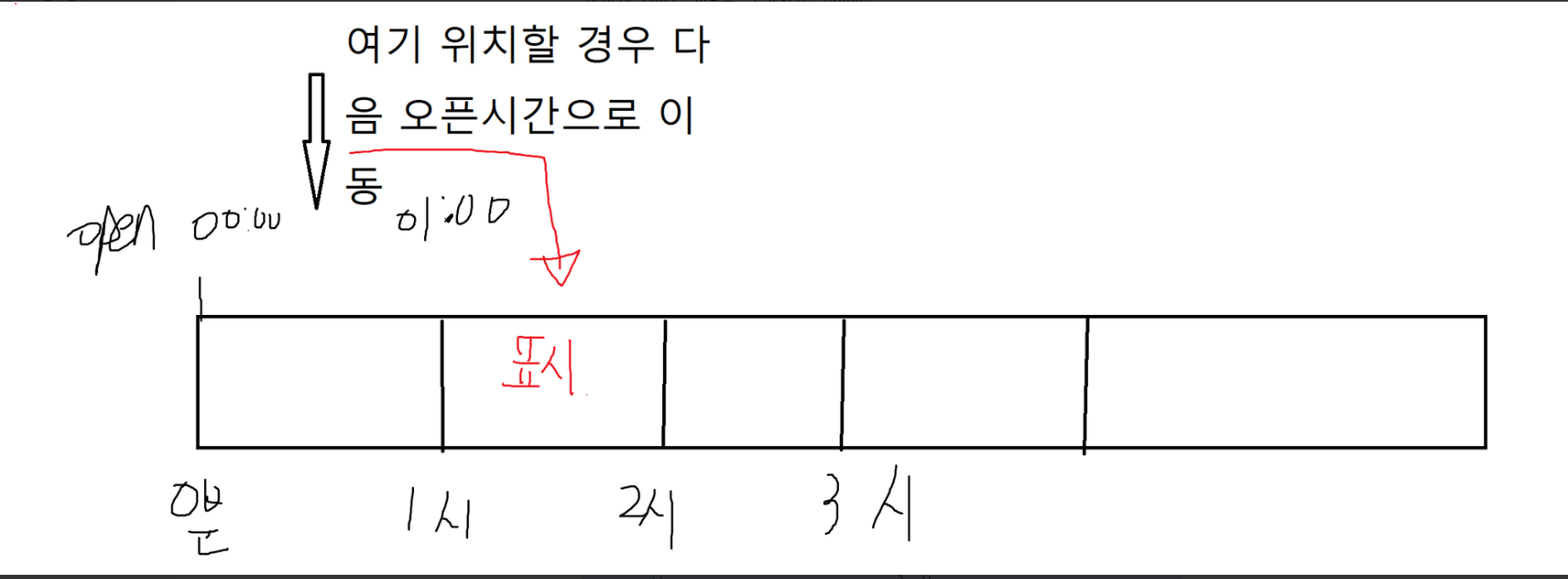
이때는 마지막에 계산한 유닉스 타임을
"your unix time" - ("your unix time" % (timeframe.in_seconds(timeframe.period)*1000))이런 방식으로 계산해주면 된다.
참고로 timeframe.in_seconds은 현재의 주기를 초로 환산해서 나타내준다.
6. 기타 유용한 함수
str.tostring() : str형식으로 변환해줌
str.tonumber() : int형식으로 변환
str.split() : str 나누기
timestamp() : 유닉스 시간으로 변환
'날것 그대로의 공부기록 > pinescript' 카테고리의 다른 글
| bybit order history 트레이딩 뷰에 표시하기 (0) | 2023.04.24 |
|---|
